
Ships and docks
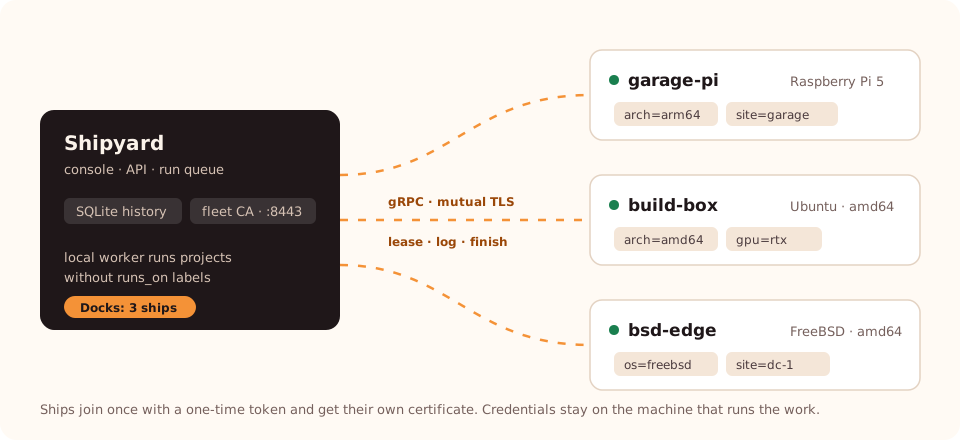
A ship is a worker on another machine — a Raspberry Pi next to the hardware it tests, a build box with more cores, a FreeBSD host. Ships connect to Shipyard, lease runs, execute them locally and send logs and results back. Docks in the console lists every ship.
How it works
- Shipyard opens a fleet endpoint (gRPC over TLS, port 8443 by default) with its own certificate authority.
- You create a one-time join token in Docks. It is valid for one hour and carries the CA fingerprint, so the ship verifies it is talking to your Shipyard.
ship joinexchanges the token for the ship's own client certificate. From then on every call uses mutual TLS.- A project with
runs_onlabels runs only on a ship that carries all of them. Projects withoutruns_onstay on the Shipyard machine. - Credentials never travel: a run tells the ship which environment variable or file holds a key, and the ship reads it locally.
1. Open the fleet endpoint
Add to Shipyard's configuration and restart:
runtime:
  api_token_env: SHIPYARD_API_TOKEN
fleet:
  listen: 0.0.0.0:8443
  address: shipyard.lan:8443          # what ships dial
  hosts: [shipyard.lan, 192.168.1.10] # names and IPs in the server certificate
Ships must reach address. Open TCP 8443 to them in your firewall. With Docker, publish 8443 next to 8080.
2. Route a project to ships
projects:
  - id: firmware
    repository: you/firmware
    enabled: true
    runs_on: [arch=arm64, site=garage]
    # …
Runs of firmware wait in the queue until a ship with both labels is free.
3. Install the ship
Download ship for the machine's platform from Downloads:
sudo install -m 0755 ship-linux-arm64 /usr/local/bin/ship
sudo useradd --system --home-dir /var/lib/ship --shell /usr/sbin/nologin ship
sudo install -d -m 0700 -o ship -g ship /var/lib/ship
4. Join
In the console open Docks → Add ship, give it a name and labels, and copy the command.
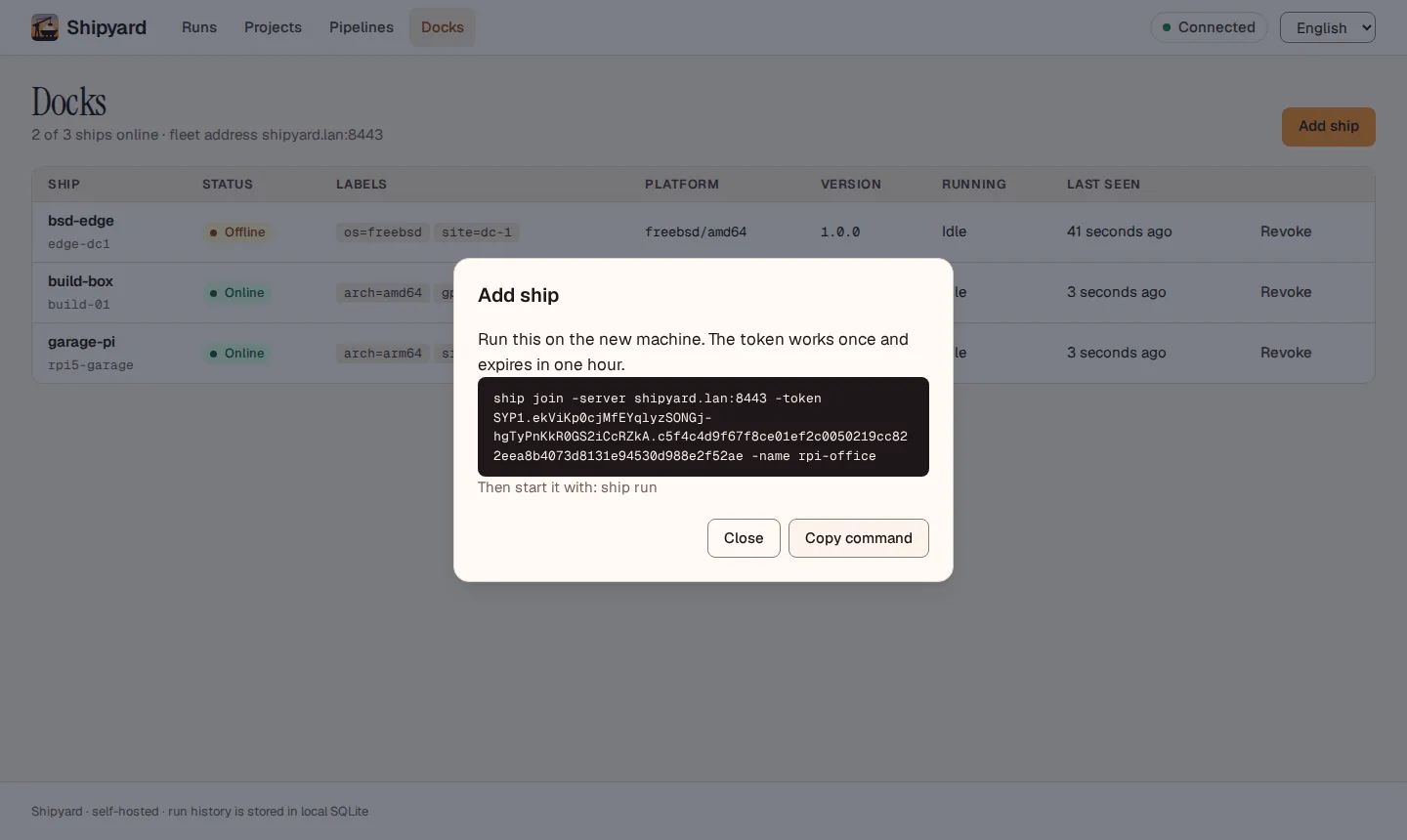 Run it on the new machine as the
 ship user:
sudo -u ship ship join -server shipyard.lan:8443 -token SYP1.… -name garage-pi
The ship writes its identity, private key and certificate to /var/lib/ship. The private key never leaves the machine. A token works once; create a new one for every ship.
5. Run it as a service
/etc/systemd/system/ship.service:
[Unit]
Description=Shipyard ship
Wants=network-online.target
After=network-online.target

[Service]
User=ship
Group=ship
StateDirectory=ship
StateDirectoryMode=0700
EnvironmentFile=-/etc/ship/ship.env
ExecStart=/usr/local/bin/ship run -state /var/lib/ship
Restart=always
RestartSec=5s
UMask=0077
NoNewPrivileges=true
ProtectSystem=strict
ProtectHome=true

[Install]
WantedBy=multi-user.target
sudo systemctl daemon-reload
sudo systemctl enable --now ship
journalctl -u ship -f
Put the provider keys this ship's runs need into /etc/ship/ship.env (mode 0600), e.g. OPENAI_API_KEY=…. A local model server on the ship (Ollama, vLLM) needs no key at all.
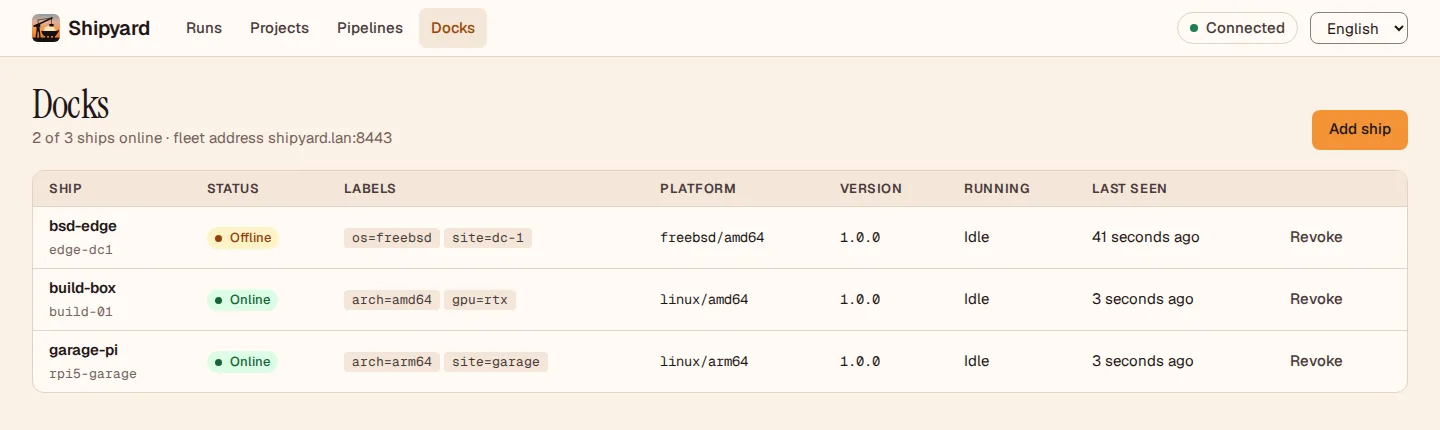
Docks
| Column | Shows |
|---|---|
| Status | Online — called in within 15 seconds. Offline — not heard from. Revoked — no longer allowed. |
| Labels | What the ship carries for routing. |
| Platform, version | Reported by the ship. |
| Running | The run it is executing now, or Idle. |
Revoke cuts a ship off immediately: its certificate stops working, and a run it was executing is recovered like any interrupted run. To bring the machine back, join it again with a new token.
The run panel shows Ran on — the ship, or the Shipyard machine — for every run.
Commands
ship join -server HOST:PORT -token TOKEN [-name NAME] [-label key=value]... [-state DIR]
ship run [-state DIR]
ship version
-state defaults to /var/lib/ship. Labels given with -label are added to those in the token.